ReelControl: Precise Instagram video playback and frame capture
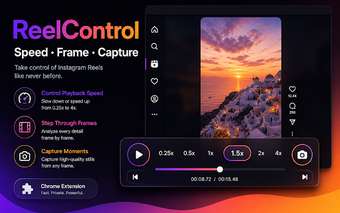
ReelControl, created by belhyun, is a Chrome extension that adds professional playback tools for Instagram videos. It embeds advanced controls into the Instagram web interface so users can inspect Reels and feed clips without leaving the page. The extension's headline utilities include a floating control bar and adjustable playback speeds for detailed review. It targets content creators, video editors, and reviewers who need frame-accurate inspection and quick frame captures during browser-based workflows, reducing the need to export footage to separate tools.
Frame-accurate stepping and capture support professional review
The extension supplies keyboard-driven frame stepping and an on-page capture workflow: left and right arrow keys step frames and the 'C' key saves the current frame as a PNG. That combination lets motion analysts and reviewers freeze motion precisely and extract high-quality stills for documentation, proofing, or editorial notes without leaving the browser tab. Shortcuts reduce repetitive clicking during clip-by-clip inspection.
Lightweight operation keeps the browser responsive during analysis
User reception highlights a lightweight footprint and in-browser processing, which limits external uploads during use. The tool performs controls and captures locally, reducing additional network requests while you review clips. Preferences persist in local storage so UI choices survive across sessions, and the extension is positioned as a focused add-on for quick inspection tasks rather than a substitute for full editing software.
Local processing enforces a zero-data-collection privacy model
The developer built the extension to run entirely in the browser and not to collect account credentials or watch history. That stated policy confines video frames and preferences to the device and avoids sending activity to third-party servers. For users with privacy concerns, this design reduces exposure to external telemetry by keeping analysis and captures on the local machine.
Single-site scope fits Instagram workflows but restricts reuse elsewhere
The tool functions only on instagram.com and operates in Chrome and other Chromium-based browsers, which narrows its practical coverage. That single-domain focus delivers concentrated capability for Instagram work, yet prevents applying the same controls to other social platforms or general video sites. Because preferences are stored locally, settings do not propagate automatically across separate devices.
A focused browser tool for in-page inspection, best for single-device workflows
ReelControl is a practical, narrow utility for users who perform precise, in-browser video inspections and who prioritize local handling of frames and settings. Its single-site design favors Instagram-centric workflows and single-device use. Users who need cross-platform coverage or automatic cross-device synchronization should consider alternative approaches; for targeted, privacy-conscious review inside the browser, this extension is a suitable choice.